We let you search by feature, audience, work mode, or technical topic. The directory connects each capability to the app and workflow where people use it.
Bring messages, files, schedules, and next steps into one connected workspace.
Move from an important email to the documents, meetings, and next steps around it without losing context.
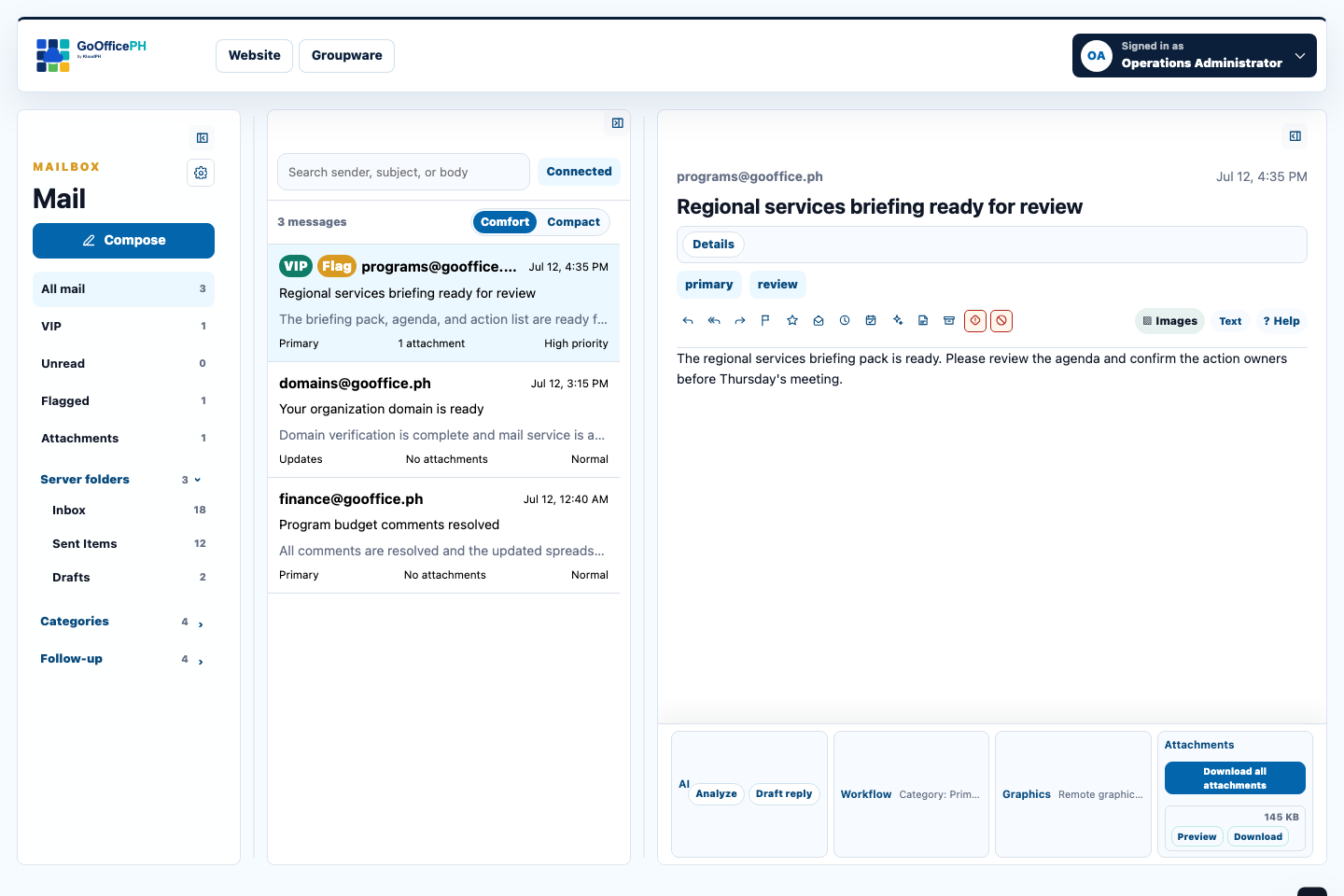
MailKeep important messages, attachments, safety checks, and follow-up in one focused inbox.Explore Mail
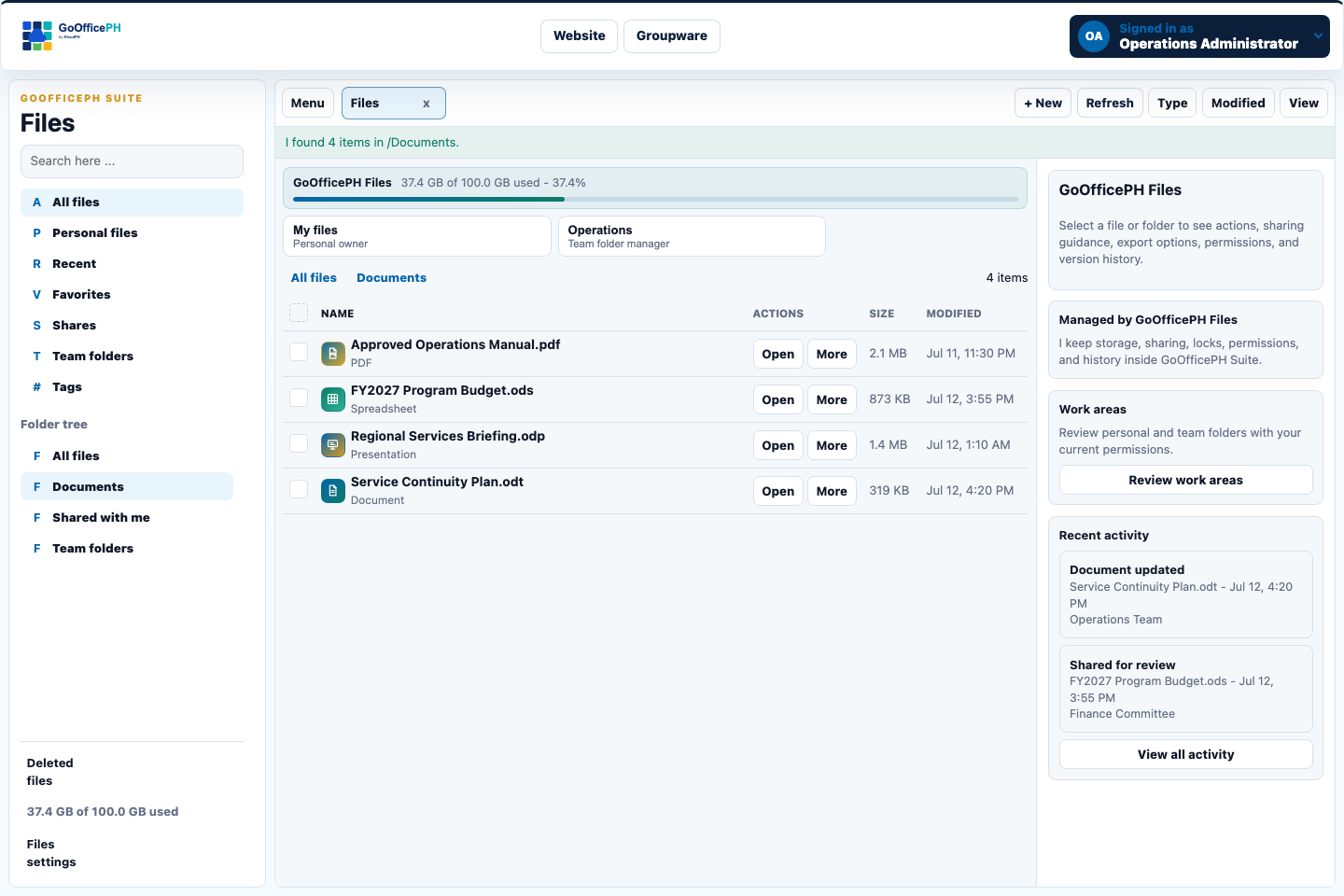
SuiteCreate, share, review, and organize files without leaving your GoOfficePH workspace.Explore Suite
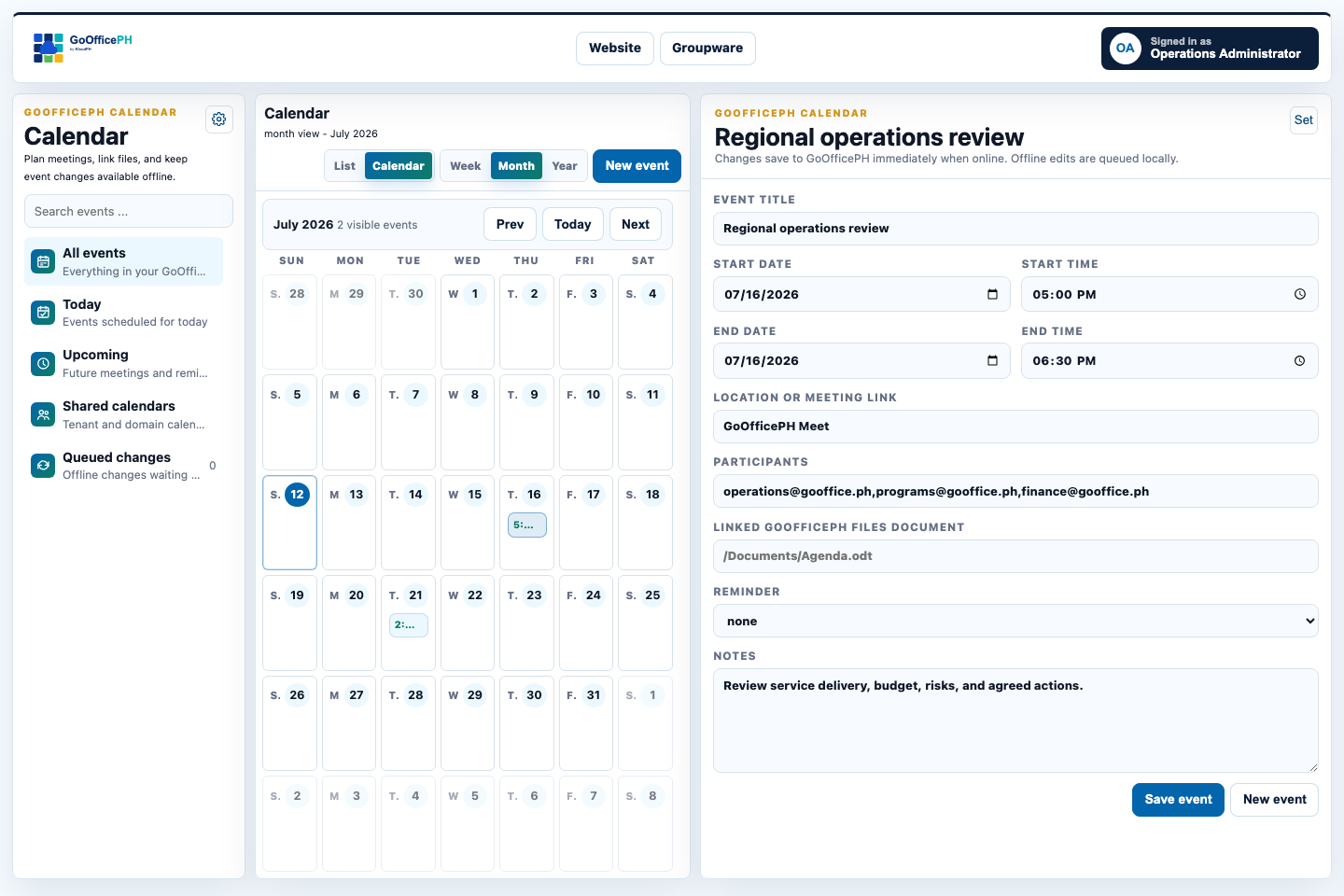
CalendarTurn schedules into coordinated work with participants, meetings, reminders, and linked files.Explore Calendar
Online, desktop, and mobile
Work in the browser, on desktop, and on mobile with one GoOfficePH identity.
Carry the same access, organization policies, and work context across every app mode, whether you are at a desk or on the move.
Online apps
The browser workspace is the main operating surface for email, files, office editing, Chat/Meet, Calendar, Contacts, tenant administration, migration, credits, and reports.
GoOfficePH Groupware Desktop adds local cache, offline queues, activation checks, and GoOfficePH-confirmed sync for users who need continuity beyond a browser session.
Mobile apps are planned for field access, urgent notices, approvals, mobile mail, meetings, files, calendar, and contacts under the same GoOfficePH controls.
Put official work under the people and policies responsible for it.
We group email, documents, meetings, calendars, contacts, records, and audit trails around locally accountable work. Tenant controls, access boundaries, and reporting help each organization apply the governance and sector obligations appropriate to its work. Explore the operating context
Sovereignty
Online, desktop, and mobile access all point back to the same Philippine-hosted GoOfficePH control plane. Users can work through a browser or managed desktop app, but identity, policies, domains, credits, storage, and support remain tied to a local service model.
Control
Tenant admins can manage users, domains, aliases, storage pools, app access, renewal behavior, migration imports, and delegated roles. ICT teams can define practical guardrails while employees keep using a straightforward GoOfficePH workspace.
Auditability
Important actions such as sign-ins, credit grants, app activations, domain setup, support requests, migration jobs, encryption changes, and sync results are recorded so tenant admins and authorized GoOfficePH staff can review what happened later.
Capability map
Where the app-level features now live.
Mail, Suite, Chat/Meet, Calendar, Contacts, Sync Queue, and Settings are not first-class website menu items because they are product capabilities inside GoOfficePH. Use the grouped links below to jump to the right explanation.
We group features around the jobs customers actually need to complete: communicate, store files, edit documents, administer tenants, secure access, migrate data, maintain continuity, and operate the service responsibly under Philippine-hosted governance.
Showing all features.
No matching feature found.Try a broader word such as mail, storage, domain, support, encryption, migration, or tenant.
Workspace
Everyday productivity apps
Workspace
Unified app launcher
Users land in a GoOfficePH launcher where Files, Mail, Office Suite, account settings, credits, storage, support, and tenant tools are available from one signed-in session.
Plain meaningPeople do not need to remember where a task lives. GoOfficePH becomes the front door.
Technical viewSession state is surfaced through GoOfficePH UI while app links use single sign-on and role-aware menu rendering.
Files
Tenant file storage
Store personal and shared folders in a Philippine-hosted workspace with Documents, Templates, Shared folders, sharing controls, and file history.
Plain meaningCompany files stay in the same workspace as mail and office documents, instead of being scattered across personal drives.
Technical viewWe use the file platform as the trusted storage, sharing, locking, and versioning layer while branding and account controls remain GoOfficePH-facing.
Office Suite
Documents, spreadsheets, and presentations
Create and edit documents, sheets, slides, and PDFs in the browser, with OpenDocument formats preferred for new work and exports for external collaboration.
Plain meaningTeams can write reports, manage trackers, prepare decks, and review files without leaving GoOfficePH.
Technical viewGoOfficePH Suite manages file sharing, document work, storage, sync, locks, templates, exports, and quota-aware editor sessions through GoOfficePH-owned APIs.
Groupware
Groupware catalog
Mail, Suite, Chat/Meet, Calendar, Contacts, Work Boards, Whiteboard, Wallet, and Connected Workspace are grouped on the live GoOfficePH Groupware page.
Plain meaningCustomers open Groupware and choose the native app they need for daily work.
Technical viewThe Groupware catalog keeps SSO and GoOfficePH shell behavior while workspace services remain isolated behind GoOfficePH-owned APIs.
Communications
Chat and Meet
GoOfficePH-native chat and meetings add secure team rooms, invited guest access, voice, video, and screen sharing to the sovereign workspace.
Plain meaningTeams can message, meet, and invite guests without moving daily collaboration outside GoOfficePH.
Technical viewChat and Meet uses GoOfficePH identity, tenant permissions, guest-limited invite tokens, audit events, and GoOfficePH media sessions for voice and video traffic.
Groupware
GoOfficePH Groupware
Mail, Suite, Chat/Meet, Calendar, Contacts, Work Boards, Whiteboard, Wallet, and Connected Workspace share one app language, with managed desktop packages continuing the former offline-workspace direction.
Plain meaningMail, documents, calendars, meetings, whiteboards, credits, and follow-up work feel like one GoOfficePH product instead of separate tools.
Technical viewGroupware apps share the GoOfficePH shell, icon registry, settings patterns, API-backed sync, local queues, support reporting, and signed duration-limited desktop activation codes.
Files
PDF workflows
View, organize, export, and share final copies such as forms, invoices, manuals, reports, and approved documents.
Plain meaningFinished documents can live with the working files that produced them.
Technical viewPDF handling stays tied to the file store, permissions, and export workflows rather than becoming a separate document silo.
Mail
Sovereign email and mailbox controls
Email
GoOfficePH Mail
Every user can have a mailbox under @GoOffice.ph or a verified tenant domain, with webmail and standards-based mail access.
Plain meaningUsers can keep a professional mailbox inside the same GoOfficePH account they use for files and documents.
Technical viewThe mail layer is designed around modern mail protocols, tenant domains, mailbox provisioning, and JMAP-first growth with IMAP and SMTP support.
Mail apps
Connect a mail app with app passwords
Users can connect Outlook, Apple Mail, Thunderbird, or mobile mail apps with guided settings and revocable app passwords.
Plain meaningPeople can use their preferred mail app without giving that app their main GoOfficePH password.
Technical viewGoOfficePH exposes IMAP and SMTP settings, generated app-password lifecycle, copy-once secrets, revocation, and quota-aware warning messages.
Mail controls
Email aliases across owned domains
Tenant admins can create alternate addresses for users or role mailboxes under domains the tenant owns and has verified.
Plain meaningOne person or team can receive mail at more than one business address.
Technical viewAlias management is scoped by tenant domain ownership, delegated permissions, mailbox provisioning state, and audit logging.
Mail privacy
Masked email addresses
Tenant admins can create labeled masked addresses for users, including generated address names for signups, suppliers, campaigns, and other cases where the user does not want to expose their main mailbox address.
Plain meaningA user can receive mail through a separate address and revoke it later if it starts receiving unwanted mail.
Technical viewMasked email uses the same tenant-domain alias provisioning path as normal aliases, with first-class type, labels, audit events, revocation, and mailbox alias synchronization.
Mail controls
Forwarding, vacation replies, and sender rules
Users and authorized tenant admins can manage forwarding, keep-copy behavior, vacation messages, and sender allow or block rules from GoOfficePH.
Plain meaningCommon mailbox settings are available inside GoOfficePH, where users and tenant admins already manage their accounts.
Technical viewGoOfficePH stores policy intent, applies it to the mail service, records sync status, and audits changes.
GoOfficePH Mail AI
User-controlled AI mail assistance
Users can control whether GoOfficePH Mail highlights urgent, billing, security, and custom keyword messages, prepares summaries, suggests actions, or runs in a privacy-first/off mode.
Plain meaningPeople can make the inbox smarter without being forced into AI behavior they do not want.
Technical viewAI preferences are stored per GoOfficePH account, included in signed GoOfficePH Mail sessions, enforced by GoOfficePH Mail, and audited when changed.
Encryption
Optional or tenant-required mailbox encryption
Users can enable private mailbox encryption, while tenant admins can make encryption optional, require user-managed keys, or apply a tenant-managed public key by domain.
Plain meaningMore sensitive mailboxes can add stronger privacy controls, with clear warnings that lost private keys may make mail unrecoverable.
Technical viewGoOfficePH records key type, public-key hash, tenant policy mode, encryption-on-append behavior, spam-training preference, sync status, and audit trails.
Encryption migration
Existing mail conversion assistant
When historical mail must be encrypted or decrypted, GoOfficePH estimates mailbox counts, cost, and duration before launching a controlled local conversion assistant.
Plain meaningUsers see the expected time and credits before converting older messages, and private keys stay in the local assistant session.
Technical viewJobs use snapshot counts, checkpoints, credit pricing per message batch, local private-key handling, status updates, pause/resume controls, and notices for mail that arrives after the snapshot.
Mail operations
Mail deliverability hardening
GoOfficePH mail domains are checked for the records and service endpoints needed by a professional email service.
Plain meaningCustomers get guidance so company email is more likely to send, receive, and authenticate properly.
Technical viewDNS validation covers ownership, MX, SPF, DKIM, DMARC, PTR alignment, TLS endpoints, autoconfig/autodiscover readiness, and mail activation state.
Tenant administration
Company setup, domains, users, and quotas
Onboarding
Personal accounts and tenant applications
Users can start as individuals, then create a tenant for a company, organization, or institution when they need multiple managed users.
Plain meaningOne person can start small, then become the tenant admin when the organization is ready.
Technical viewTenant requests track applicant identity, requested domain, seats, storage, business purpose, approval status, provisioning state, and onboarding action items.
Tenant admin
Tenant dashboard
Tenant admins can review users, open requests, seats, storage, provisioning status, recent activity, and next steps from one dashboard.
Plain meaningCompany administrators can see what needs attention without visiting separate tools.
Technical viewThe dashboard aggregates tenant profile, membership, storage, app entitlements, audit events, support tasks, and domain readiness.
Bulk users
Bulk invite uploads with preflight checks
Tenant admins can upload a CSV invite list, validate every row, preview results, and provision only after the file passes required checks.
Plain meaningLarge user onboarding is less error-prone because bad rows are caught before accounts are created.
Tenants can add company domains, receive plain-language DNS instructions, verify ownership, and activate mail once the required records are ready.
Plain meaningCompanies can use addresses that match their brand without asking users to understand DNS jargon.
Technical viewDomain records track verification state, DNS checks, mail-domain IDs, primary status, resource-pool assignment, mail policies, and activation jobs.
Domains
Assisted DNS setup
Tenant admins can request GoOfficePH-assisted DNS configuration or follow manual instructions with a verification loop until the domain is ready.
Plain meaningNon-technical administrators can choose help instead of manually creating every DNS record.
Technical viewAssisted setup records source service, scoped API credential intent, authorization, audit trail, DNS validation results, and activation status.
Domains
Domain search and purchase option
Tenant admins can search for a new domain, review pricing, confirm the purchase twice, and let GoOfficePH apply the required domain setup after registration.
Plain meaningA tenant that does not already own a domain can start from inside GoOfficePH.
Technical viewThe workflow is built for registrar API integration, credit checks, double confirmation, auditable purchase intent, and automatic DNS/mail-domain provisioning.
Domains
Multiple domains with resource pools
One tenant can manage many verified domains and assign them to shared or dedicated resource pools for storage, mail, policy, and reporting control.
Plain meaningSeveral brands, departments, or subsidiaries can live under one tenant without forcing a separate tenant for every domain.
Technical viewDomain policies inherit from user override, domain policy, resource-pool policy, and tenant default, supporting shared or isolated quota models.
Storage
Pooled storage with minimum and maximum user limits
Tenants buy shared capacity, then give each user a minimum guaranteed allocation and a maximum elastic cap.
Plain meaningStorage can flex inside the tenant pool instead of locking unused space to one person forever.
Technical viewTenant, resource-pool, domain, and user storage settings feed quota enforcement, reports, entitlement checks, and upgrade requests.
Shared quota
One storage pool for Files and Mail
Tenant storage can be measured as one shared pool across GoOfficePH Files and GoOfficePH Mail, so admins see total consumption instead of separate, confusing limits.
Plain meaningA user or tenant can spend capacity on files, email, or both, while We keep the total within the subscribed allowance.
Technical viewGoOfficePH collects Files usage and mailbox usage separately, reconciles them into tenant resource pools, syncs caps back to the storage engines, and can reject new mail when the combined limit is exhausted.
Delegation
Delegated tenant and domain administration
Tenant admins can grant trusted users limited rights such as managing users, aliases, mailbox settings, or a specific domain without giving full tenant control.
Plain meaningResponsibilities can be shared safely as the organization grows.
Technical viewDelegations map to scoped role permissions, tenant-domain assignments, inherited access checks, and revocable audit-backed grants.
Security and governance
Identity, permissions, audit, and privacy
Identity
GoOfficePH ID single sign-on
One GoOfficePH ID opens the portal, workspace, mail, files, tenant tools, and account settings with one-login and one-logout behavior.
Plain meaningUsers sign in once and move around GoOfficePH without seeing separate service login screens.
Technical viewWe use centralized identity, SSO redirects, session-aware public pages, and account synchronization for linked services.
Account security
Multi-factor and passkey-ready security
GoOfficePH account settings support stronger sign-in patterns such as authenticator apps, recovery codes, and passkey-ready workflows for higher-assurance accounts.
Plain meaningImportant accounts can be protected by more than a password.
Technical viewSecurity controls are surfaced through GoOfficePH account UI while identity functions remain behind the GoOfficePH experience.
RBAC
Role-based access control
GoOfficePH staff and tenant administrators can hold multiple roles, and Platform Admin acts as the root role with all lower permissions.
Plain meaningPeople get the access they need for their job, and no more.
Technical viewPermissions are additive, stored centrally, synchronized to identity roles, audited on change, and checked server-side before sensitive actions run.
RBAC
Role-view toggle for staff testing
Authorized GoOfficePH staff can view the portal as a lower role to learn workflows, validate support steps, and troubleshoot without changing their actual account.
Plain meaningStaff can see what customers see while keeping their real permissions intact.
Technical viewThe active role view scopes menu visibility and authorization context while preserving actual roles for audit and recovery.
Tenant branding
Tenant-controlled brand profile
Tenant administrators can set a display name, logo URL, brand colors, support link, and footer note for tenant-facing GoOfficePH experiences.
Plain meaningOrganizations can make GoOfficePH feel familiar to their users while still keeping the service governed by GoOfficePH by KloudPH.
Technical viewTenant branding is stored centrally, permission-gated, audited, and exposed through GoOfficePH APIs instead of separate platform screens.
Audit
Audit logging for important actions
Role changes, credit-affecting actions, app activations, storage updates, domain events, support responses, and account changes are recorded for review.
Plain meaningImportant operational decisions leave a trail that can be checked later.
Technical viewAudit entries link actor, action, target type, target ID, message, metadata, timestamps, and permission-gated report visibility.
Notices
Urgent action items
Critical onboarding or account tasks can be shown to the right user when they sign in, such as domain setup, DNS validation, or account issues.
Plain meaningImportant setup tasks do not get lost in email or hidden pages.
Technical viewAction items are role-scoped, tenant-aware, permission-filtered, and linked to the appropriate GoOfficePH workflow.
Sovereign
Philippine-hosted data location
We position GoOfficePH as a locally hosted office collaboration platform for organizations that need clearer data location, accountability, and jurisdictional fit.
Plain meaningCustomers have a clearer answer when asked where mail, files, and office work are hosted.
Technical viewPublic materials emphasize Philippine hosting, identity governance, local operations, DNS/mail hardening, and reviewable open-source foundations.
Transparency
Reviewable open-source foundations
We combine open-source foundations with GoOfficePH integration code, branding, account controls, and operational workflows.
Plain meaningThe platform is not a black box stitched together with hidden behavior.
Technical viewSource is maintained in local repositories, while GoOfficePH-facing middleware integrates mail, files, office editing, identity, portal, analytics, and credits.
Migration and imports
Move into GoOfficePH with checks and checkpoints
Migration
Import into GoOfficePH
Users can plan imports into GoOfficePH for mail, files, documents, contacts, and calendars.
Plain meaningMoving to GoOfficePH does not have to mean starting over with an empty mailbox and empty folders.
Technical viewImport jobs store source service, selected apps, destination, authorization mode, estimated data size, expected duration, progress, pause state, and audit history.
Migration security
Secure source connection or temporary app-password guidance
GoOfficePH prefers secure source connection where supported, and explains app-password fallback when a source service requires it.
Plain meaningUsers are guided toward safer authorization instead of casually giving away their old account password.
Technical viewThe import workflow separates authorization metadata from user-facing instructions, records the selected method, and advises revocation after migration.
Migration control
Estimates, progress, pause, resume, and abort
Users review estimated import time and storage impact before starting, then monitor progress and pause or resume jobs later.
Plain meaningMigration becomes visible and controllable instead of feeling like a mystery background task.
Technical viewJobs persist across login sessions with status transitions, checkpoints, progress metrics, abort flags, and support-readable diagnostics.
Preflight
Pre-import safety checks
Large uploads and migration plans are checked before execution so bad input does not overwhelm the system or create unwanted changes.
Plain meaningThe system catches mistakes before they become account, billing, or storage problems.
We use credits for app activation, storage, renewals, coupons, staff grants, and commercial plan entitlements. One credit is presented as one Philippine peso.
Plain meaningCustomers can understand what they are spending and what service they are enabling.
Technical viewCredit-affecting actions use confirmations, ledger-style records, audit trails, rollback-aware transaction handling, and permission-gated staff tools.
Entitlements
App and storage subscriptions
Users can enable Files, Email, Office Suite, GoOfficePH Groupware, and storage extensions with visible active days, renewal needs, and expiry warnings.
Plain meaningUsers know what is active, when it expires, and how many credits are needed to continue.
GoOfficePH staff with the right permissions can create, update, enable, disable, and package plans without changing code.
Plain meaningWe can adapt offerings as customer needs and market pricing change.
Technical viewPlans store SKU, included apps, monthly credits per user, storage, support priority, audit level, backup policy, analytics level, compliance reporting, renewal behavior, and public visibility.
Promotions
Discounts, coupons, and monthly free credits
Authorized staff can grant credits, create coupons, assign discounts, and upload benefit lists with preflight checks and audit records.
Plain meaningSales, support, and billing teams can help customers while keeping every benefit traceable.
Technical viewBenefit imports validate account targets, owners, limits, rows, expiry, duplicate data, reason fields, and final confirmation before ledger updates.
Renewals
Auto-renew and low-credit alerts
Users can choose renewal frequency and receive reminders before apps or storage expire, especially if their credit balance is not enough.
Plain meaningService does not suddenly lapse without warning.
Technical viewGoOfficePH tracks monthly, quarterly, semi-annual, and annual preferences plus 30, 15, 7, 3, 2, and 1 day warning windows.
Operations and support
Support, reporting, analytics, and service management
Support
Support tracker with attachments
Users can report bugs, request features, ask support questions, attach screenshots or documents, and follow ticket updates in GoOfficePH.
Plain meaningSupport conversations are kept in one place with evidence attached.
Functional addresses such as support, sales, billing, security, privacy, abuse, and onboarding can route to staff based on role and permission.
Plain meaningCustomers can contact the right team without knowing individual staff members.
Technical viewCRM queues map functional inboxes to staff roles, reply permissions, visibility rules, ticket context, and audit history.
Analytics
Tenant analytics
Tenant admins can review usage and activity for their own tenant, including users, apps, storage, account visits, and domain-level trends.
Plain meaningCompany administrators can understand how their workspace is being used.
Technical viewTenant analytics are scoped to tenant-owned users and resources, with domain, pool, storage, app, activity, and account status signals.
Analytics
Platform Analytics
Authorized GoOfficePH staff can review website traffic, account activity, app usage, storage mix, user counts, and trend reports across daily, weekly, monthly, and yearly views.
Plain meaningWe can see whether the platform and website are helping users and customers.
Technical viewReports use permission-gated aggregations for site sessions, pages, account groups, user activity, app events, storage types, tenant scope, and staff-only metrics.
Assurance
Backup policy and compliance reporting options
Higher-assurance plans can expose stronger audit visibility, backup policy labels, priority support, and compliance reporting features.
Plain meaningRegulated or sensitive organizations can choose a plan with stronger operating assurances.
Technical viewCommercial plans can encode audit level, backup policy, support priority, analytics level, and compliance report availability for entitlement and reporting workflows.
Experience
GoOfficePH-facing service integration
GoOfficePH presents customer-facing screens and messages while workspace services are integrated behind the GoOfficePH experience.
Plain meaningUsers see GoOfficePH, not a confusing collection of separate vendor interfaces.
Technical viewBranding, navigation, account menus, error messages, support flows, and app links are mediated through GoOfficePH UI and middleware where possible.